

Artificial intelligence (AI) has transformed everyday life, including how we handle mundane tasks like house cleaning. Robotic vacuums and smart home systems use AI to keep our homes cleaner, more efficient, and save time and effort. This article explores how AI is revolutionizing house cleaning.
The Rise of the Robotic Vacuum
The robotic vacuum is perhaps the most iconic example of AI in house cleaning. These small, disc-shaped devices roam floors autonomously, sucking up dust, pet hair, and debris. Powered by AI, they use dust sensors to identify high-traffic areas and adjust suction power accordingly. Early robotic vacuums were simple. Now, they have smart features like finding dirt and mapping homes. This helps them move easily around different spaces. Brands like iRobot and Ecovacs have made these gadgets common in homes. They show that AI can handle tough cleaning tasks.
Smart Home Integration
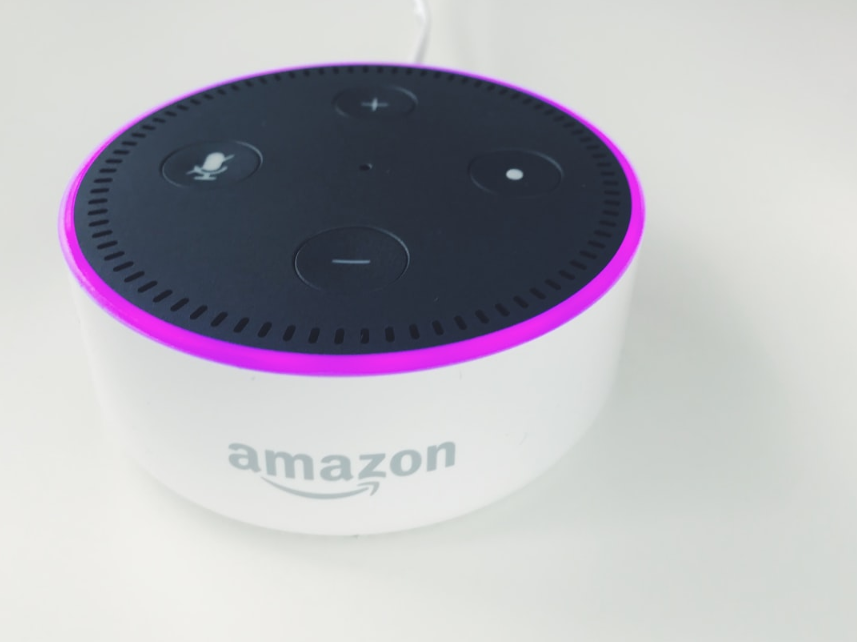
A smart home is the backbone of AI-driven cleaning. Homeowners can manage cleaning tasks easily. They can connect devices like robotic vacuums, air purifiers, and mopping systems to a central hub. AI assistants, such as Amazon’s Alexa or Google Assistant, enhance this ecosystem with voice control. Imagine saying, “Alexa, clean the living room,” and watching your robotic vacuum spring into action. This seamless integration ensures that house cleaning fits into busy schedules without requiring constant oversight.
AI Assistants: Your Cleaning Commanders
AI assistants do more than just relay commands—they optimize the process. Paired with cleaning schedules, they can prompt devices to run at specific times, like vacuuming while you’re at work or mopping after dinner. These assistants learn your preferences over time, suggesting adjustments for maximum efficiency. For instance, if pet hair accumulates daily, the AI might recommend more frequent runs with allergen filters activated. This level of personalization makes house cleaning proactive rather than reactive.
Dust Sensors and Dirt Detection
Dust sensors are a game-changer in AI cleaning tech. Embedded in robotic vacuums, they detect particle concentrations and signal the device to linger in dirtier spots. Similarly, dirt detection uses cameras or infrared technology to identify messes like crumbs or mud. Together, these features ensure no corner is overlooked. A vacuum might circle a spill until it’s gone, then move on—proof that AI doesn’t just clean; it cleans smarter.
Automated Mopping: Beyond Vacuuming
While robotic vacuums handle dry debris, automated mopping tackles wet messes. Devices like the Roborock S8 can vacuum and mop. They change modes depending on the type of floor. This is possible because they can clean different surfaces. AI ensures the mop lifts when it detects carpet, preventing soggy rugs. With self-charging docks that refill water tanks, these machines require minimal human input, making sticky spills a worry of the past.
Voice Control and Remote Access
Voice control brings hands-free convenience to house cleaning. Whether you’re cooking or lounging, a simple command activates your devices. For those away from home, remote access via smartphone apps takes it further. You can start, stop, or adjust cleaning schedules from anywhere, ensuring your home is spotless upon return. This flexibility is a hallmark of AI’s role in modern living—cleaning adapts to you, not the other way around.
Obstacle Avoidance and Home Mapping
Navigating furniture and clutter is no small feat, but AI excels here too. Obstacle avoidance uses cameras and sensors to dodge chair legs, toys, or cables, preventing jams or damage. Meanwhile, home mapping creates virtual blueprints of your space. Robotic vacuums like the Roomba j7+ “remember” room layouts, optimizing paths over time. These features reduce chaos and elevate efficiency, turning a once-tedious chore into a high-tech ballet.
Self-Charging: Always Ready
Energy efficiency meets convenience with self-charging technology. When battery levels dip, AI-powered cleaners return to their docks, recharge, and resume where they left off. This autonomy ensures uninterrupted cleaning, even in large homes. Some models optimize power usage based on floor type or mess severity, further boosting energy efficiency. The result? A device that’s always ready to tackle the next spill.
Cleaning Schedules for a Consistent Clean
Consistency is key to a tidy home, and cleaning schedules deliver it. AI lets you program devices to run daily, weekly, or on custom cycles. A robotic vacuum might sweep the kitchen every morning, while an automated mopping bot refreshes the bathroom twice a week. Over time, AI refines these routines based on usage patterns, ensuring your home stays pristine with zero guesswork.
Allergen Filters: Cleaner Air, Healthier Homes
House cleaning isn’t just about floors—air quality matters too. Many AI cleaning devices include allergen filters that trap dust, pollen, and pet dander. Paired with dust sensors, these filters activate when allergens spike, improving indoor air. For allergy sufferers, this is a lifeline, turning a robotic vacuum into a health tool. It’s a reminder that AI’s impact extends beyond surfaces to the very air we breathe.
Multi-Surface Cleaning: Versatility in Action
Homes have diverse flooring—hardwood, tile, carpet—and AI adapts with multi-surface cleaning. Robotic vacuums adjust suction for carpets, while automated mopping systems regulate water on hardwood. This versatility eliminates the need for multiple devices, streamlining house cleaning. AI ensures each surface gets the right treatment, preserving floors while banishing dirt.
Energy Efficiency: Sustainable Cleaning
AI doesn’t just save time—it saves resources. Energy efficiency is baked into modern cleaning tech, with devices optimizing power based on task demands. A vacuum might lower suction on bare floors or pause when no dirt is detected, conserving electricity. Self-charging docks often use eco-friendly modes, aligning with sustainable living trends. In this way, AI makes house cleaning greener without sacrificing performance.
The Future of AI in House Cleaning
Looking ahead, AI’s role in house cleaning will only grow. Imagine drones dusting shelves or AI systems predicting messes before they happen—say, extra vacuuming after a party. Enhanced home mapping could sync with smart home data, like detecting muddy footprints via security cameras and deploying a mop. As AI assistants evolve, they might coordinate entire cleaning crews of robots, each specialized for tasks like window washing or upholstery care.
Challenges and Considerations
Despite its promise, AI cleaning isn’t flawless. High-end devices can be costly, and not all homes suit robotic navigation (think tight staircases or cluttered rooms). Privacy concerns also linger—home mapping and remote access rely on data, raising questions about security. Still, as technology advances, these hurdles shrink, making AI more accessible and trustworthy.
Conclusion
AI is redefining house cleaning, seamlessly blending convenience, efficiency, and innovation. For example, robotic vacuums with dust sensors and automated mopping with allergen filters tackle chores with precision. In addition, smart home systems, voice control, and cleaning schedules bring order to the chaos of daily life, while energy efficiency and multi-surface cleaning ensure sustainability and versatility. As AI continues to evolve, the dream of a self-cleaning home inches closer, proving that technology can turn even the dullest tasks into marvels of modern living. Need additional help keeping your home spotless? Contact Yorleny’s Cleaning Service today!

Reviewed by:
Tony Loeffler is the Co-Founder of Yorleny's Cleaning Service and a leader in residential cleaning services. As a content reviewer and writer, he is an expert around the cleaning services in Florida, specifically West Palm Beach County.
Recent Articles

Room-by-Room Cleaning Checklist for a Cleaner, More Organized Home
A room-by-room cleaning checklist is a systematic method that divides home maintenance into specific zones like kitchens, bathrooms, and bedrooms. This approach…

How to Clean a Leather Couch: Easy Methods to Keep It Looking New
Knowing how to clean a leather couch is key to keeping this type of furniture in perfect condition for many years. Unlike…
7 Expert-Verified Oven Clean Tips for a Sparkling Kitchen
Cleaning is a task that requires continuous efforts to maintain your spaces comfortable and avoid clutter during serious situations. Sometimes, we forget…
See below to check if our top-quality house cleaning services are available in your city and book your first appointment with just a few clicks.